Transparency in configuration and authorization
Valid system documentation requires continuous insight into the current configuration. With this update, we introduce dedicated information pages that centrally consolidate all aspects of user management, system security, and technical configuration and make them available directly in-app.
User information & role concept
The new user overview provides clarity regarding permissions and responsibilities:
- Identity & login: Display of current user data such as login and name.
- Roles & permissions: Detailed listing of assigned roles and the associated permissions.
- Area responsibilities: Overview of the user’s areas of responsibility (e.g. Parenterals, Utilities).
- Departments: Catalog of assigned departments and the associated user signature permissions.
Security & certificates
Security is not a static state. The new module proactively monitors the validity of SSL/TLS certificates and digital signatures. Warnings for expiring certificates are prominently displayed to ensure timely renewal.
System configuration & measurement methodology
The technical core of the system is now visualized transparently. In addition to connection parameters such as SAP or database endpoints, the physical measurement configurations are presented in detail (see Fig. 1).
Example: Visualization of filter test geometry using a circular probe
For filter tests (DEHS tests), the configured scan paths and probe geometries are graphically prepared. This includes the visualization of the applied formulas (e.g. for calculating scan time) directly within the configuration context. This significantly simplifies the verification of the mathematical basis of the performed tests for auditors.
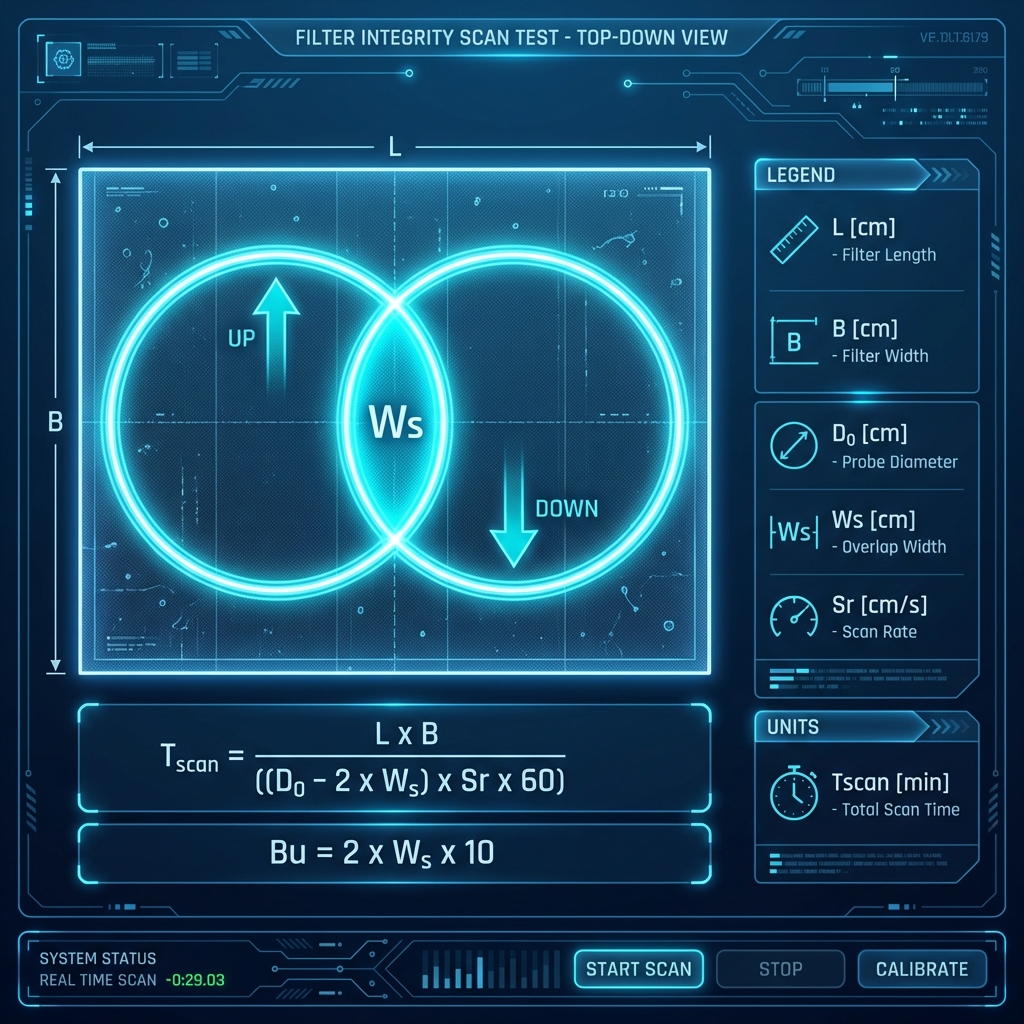
Fig. 1: Visualization of scan geometry and path overlap.
Benefit from maximum transparency and audit-ready documentation at the push of a button.